

Open Transactions
On a client’s page, choose the account by name, then select Transactions. It sits after Holdings. On the account’s Overview, Open Transactions in Recent transactions opens the same tab. Only an account has a Transactions tab. A client’s All accounts view and a household don’t list transactions.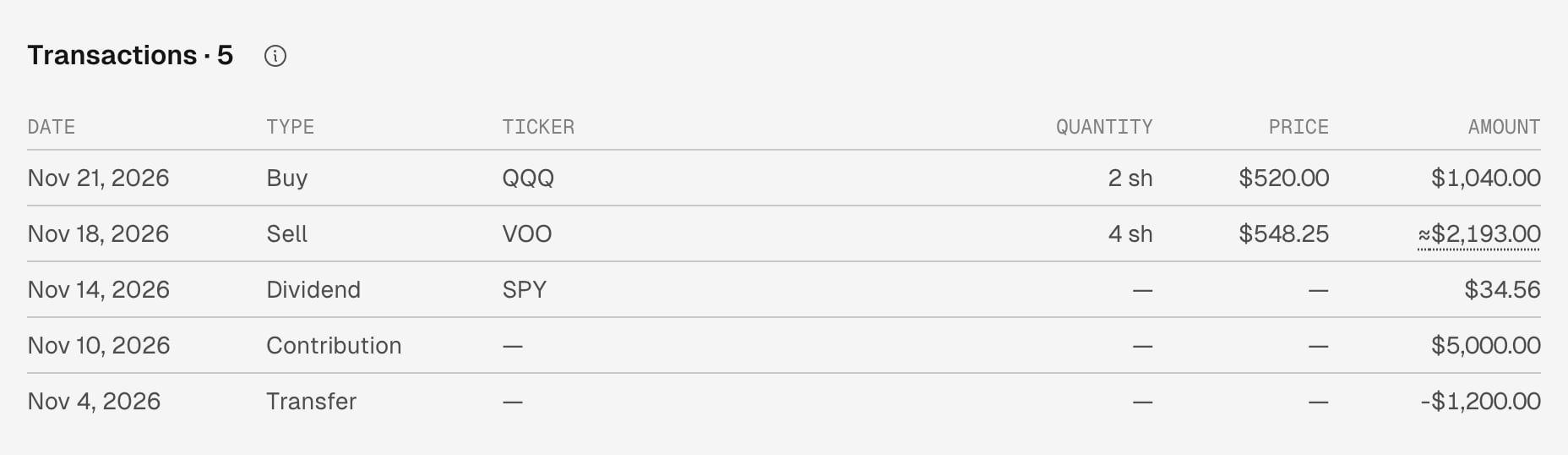
An account's Transactions tab. The sale shows ≈ because the brokerage sent no amount for it.
Read the table
The heading counts the rows, as in Transactions · 5. Under the table, a line names the brokerage and when Tilt last read it, such as “From Schwab files, through the Oct 9, 2026 close, last read Oct 13.” The close appears only for a custodian that sends files.
Read amounts
An amount shows without a sign when its type names the direction: Buy, Sell, Dividend, Contribution, Withdrawal and Fee. Every other type keeps the brokerage’s sign, so +$500.00 came in and -$1,200.00 went out. For a transfer or a currency conversion, the sign is the only thing that says which way the money moved. A transfer’s quantity carries the same sign. A buy or sell can arrive with no amount stored for it. Tilt then shows its quantity times its price, marked ≈, as in ≈$2,193.00. Click or tap the amount to read why. Treat it as an estimate of the trade’s value: the brokerage reported no cash figure for it. Some brokerage integrations work out a trade’s amount from its quantity and price themselves and store it. Tilt shows that amount without ≈, so a missing ≈ doesn’t confirm settled cash either. A Trade with no amount shows a dash: Tilt can’t tell which way its money went.When an account shows no transactions
The tab shows one sentence in place of the table. The sentence says why.Ask Tilt Agent
Tilt Agent reads the same transactions and links the tab. Open Chat on the account, or name it, and ask, for example:Show me this account’s recent transactions. How much cash did the VOO sale bring in?Tilt Agent reads 20 transactions unless you ask for more, up to 100. It calls a ≈ amount Tilt’s calculation. The transactions don’t say whether Tilt sent a trade.