Use onboarding when a new client needs a managed account in your advisor organization. This example follows the proposed setup for synthetic client Alex Rivera. Have an authoritative client reference, account holdings, and a model portfolio available before you expect the account to be ready for optimization.

1. Start the new-client workflow

Ask Tilt Agent: “Help me onboard a new client named Alex Rivera in my advisor organization. Show each proposed change before saving it.” Tilt Agent opens the client onboarding workflow. Expand its progress card to see the current step and the remaining setup steps. The example below has not created a client.
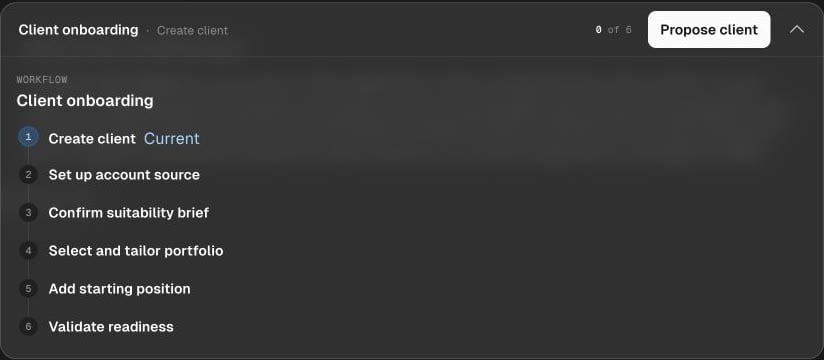
Expanded Client onboarding workflow card shows zero of six steps complete and Create client as the current step.

Tilt Agent's onboarding card shows Create client as the current step, followed by account source, suitability, portfolio, starting position, and readiness steps.

Ask Tilt Agent to propose the client identity and check for a possible duplicate before creation. Review the proposed identity and confirm the creation. A new client comes with a default account; check that account in the saved result before adding source details. If the identity already exists, resolve the match rather than creating another client. The workflow card shows the current step and the next action. A blocked step calls for missing information or a decision; it does not mean later steps were completed.

2. Record account context

Provide the account type and a non-sensitive provider label if you have them. In this workflow, these details form an internal account-source placeholder. They do not connect a custodian or import holdings. Do not enter credentials or connection secrets in chat. Tilt Agent then collects a suitability brief: objective, time horizon, risk tolerance, liquidity needs, jurisdiction and tax context, and restrictions. Review the complete brief and correct it before selecting a model. The brief is workflow context, not an approved or signed investment policy statement.

3. Select a model and tailor the account

Ask: “Compare the available model portfolios with Alex Rivera’s confirmed brief, then show the model and account changes you propose.” Review the model’s sleeves and target weights. Confirm model assignment separately from model creation or account-specific changes. A reusable model should remain shared; client restrictions and preferences belong on the account. Read Tailor an account for the settings and confirmation flow. If no suitable model or required sleeve exists, finish that setup before claiming the account is ready.

4. Add holdings and check readiness

Supply authoritative starting cash and holdings data for the exact account. Review the proposed replacement before confirming it, then ask Tilt Agent to show the saved holdings. A provider label is not evidence that positions were imported or refreshed. Ask: “Check Alex Rivera’s account readiness and list anything still missing.” Check the saved model, account settings, holdings, and reported blockers. When the account is ready, review a rebalance. Onboarding alone does not run an optimization or place an order.