> ## Documentation Index
> Fetch the complete documentation index at: https://docs.tilt.now/llms.txt
> Use this file to discover all available pages before exploring further.
# Tilt Agent
> Learn how chats, Library, Personal Skills, dashboards, and automations fit together.
Ask Tilt Agent to research, analyze, and carry out work in Tilt. Describe the outcome you need, review the result, and refine it in the same chat.
## Start with a chat
Keep related work in one chat. Include the client, account, household, Tilt, or portfolio involved, along with the evidence, format, and limits that matter.
### Work across chats
Tilt Agent can create or reuse another chat to handle part of a request. The chat you are in shows **Message sent to**. The receiving chat shows **Message from**. Select the chat name in either message to open the other chat.
Each chat has its own history. **Message sent to** means Tilt Agent asked the other chat to do the work. Open that chat to see whether the work is complete. Tilt Agent still asks you to approve financial actions, permanent deletion, and other changes that need your approval.
Tilt Agent can turn a successful conversation into reusable work:
| Save it as | Use it for |
| - | - |
| Personal Skill | Reuse instructions, examples, and guardrails in later chats. |
| Dashboard | Reopen a saved view that refreshes with current data. |
| Automation | Repeat an assignment on a schedule and post the result to chat. |
### Archive a chat
Open a chat's menu and choose **Archive** to remove it from the sidebar while preserving its transcript. To restore the chat or permanently delete it, open **Settings > Archived chats**.
## Find work in Library
**Library** contains saved Dashboards, Tilts, Posts, Files, and other items available in your workspace. Use search or choose a section when you know which item you need.
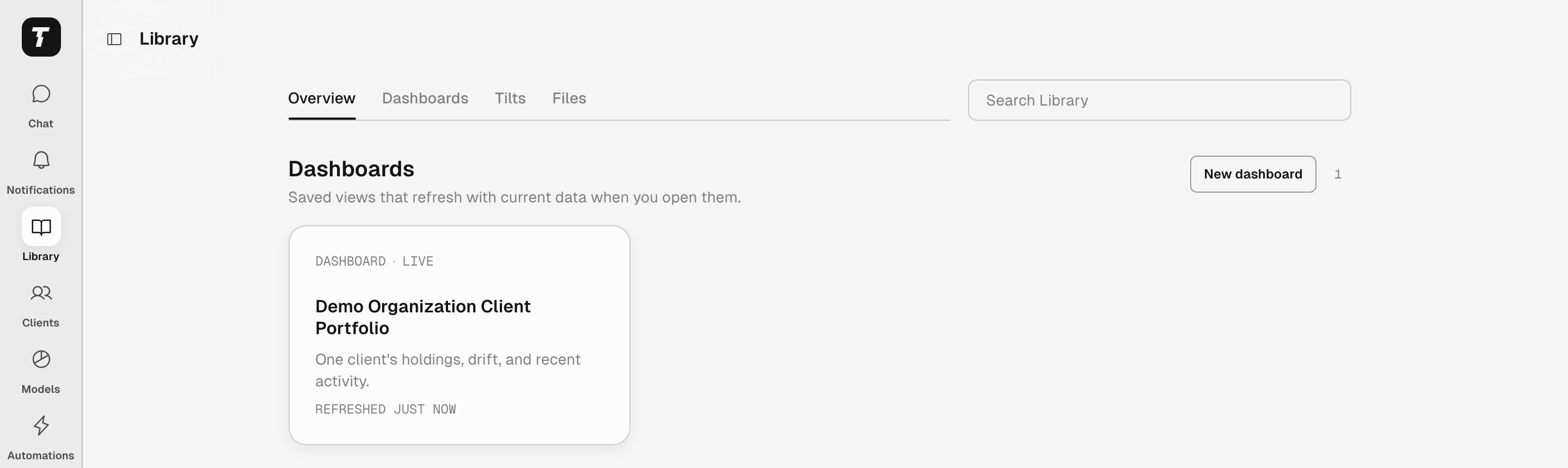 Select a Tilt in Library to open its Tilt view. Under **Explore in chat**, choose a suggested question or select **Ask anything** to write your own. New Chat opens with an editable draft and the Tilt attached as context. Nothing is sent until you select **Send**.
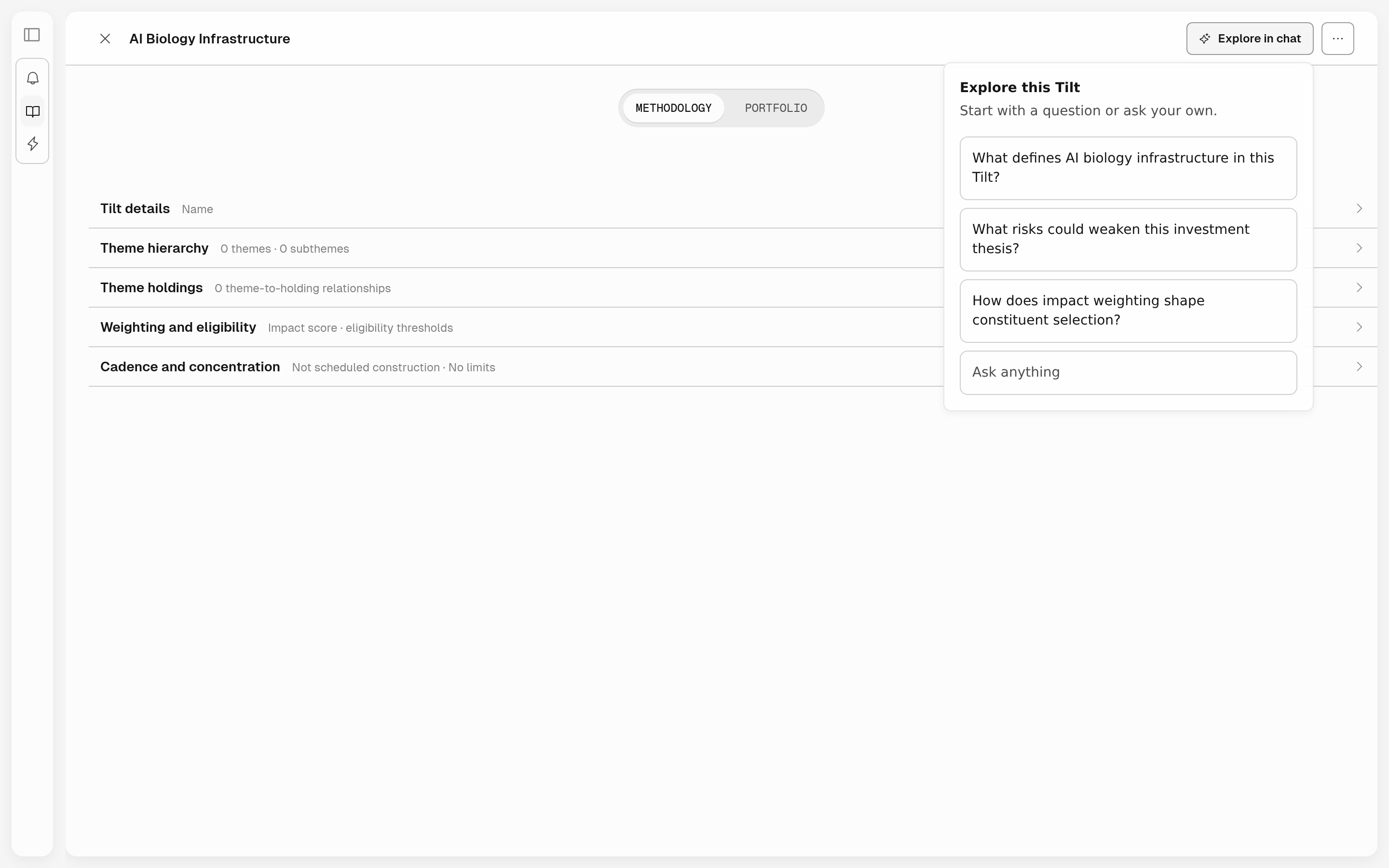 Select a Tilt reference in a sent chat message to open that Tilt. **Close** returns to the message you opened it from.
Depending on your workspace, Library may include **Households**. Open a household to start a chat with that household attached as context. If the section is available but empty, Tilt shows **No households found**.
## Add a guidance pack
Guidance Packs add starter prompts, workflows, and suggested automations for a type of work. Open **Settings > Guidance Packs** to see the packs available to you.
| Guidance pack | Use it for |
| - | - |
| Advisor | Work across an organization's clients, accounts, portfolios, proposals, and monitoring policies. |
| Advisor-Managed Accounts | Review an account that an advisor manages for you. Available actions depend on your linked-account access. |
## Build reusable work
Teach Tilt Agent a reusable workflow in chat.
Import a trusted skill and adapt it for Tilt.
Turn a useful view into a dashboard in Library.
Ask Tilt Agent to repeat work on a schedule.
Organize advisor chats, prepare client reviews, and repeat useful work.
Delegate Tilt Agent tasks from a chat or agent experience you operate.
Give Tilt Agent access to an external service's tools through an authorized connection.
This documentation is built and hosted on [Mintlify](https://mintlify.com), a developer documentation platform.
Select a Tilt reference in a sent chat message to open that Tilt. **Close** returns to the message you opened it from.
Depending on your workspace, Library may include **Households**. Open a household to start a chat with that household attached as context. If the section is available but empty, Tilt shows **No households found**.
## Add a guidance pack
Guidance Packs add starter prompts, workflows, and suggested automations for a type of work. Open **Settings > Guidance Packs** to see the packs available to you.
| Guidance pack | Use it for |
| - | - |
| Advisor | Work across an organization's clients, accounts, portfolios, proposals, and monitoring policies. |
| Advisor-Managed Accounts | Review an account that an advisor manages for you. Available actions depend on your linked-account access. |
## Build reusable work
Teach Tilt Agent a reusable workflow in chat.
Import a trusted skill and adapt it for Tilt.
Turn a useful view into a dashboard in Library.
Ask Tilt Agent to repeat work on a schedule.
Organize advisor chats, prepare client reviews, and repeat useful work.
Delegate Tilt Agent tasks from a chat or agent experience you operate.
Give Tilt Agent access to an external service's tools through an authorized connection.
This documentation is built and hosted on [Mintlify](https://mintlify.com), a developer documentation platform.