> ## Documentation Index
> Fetch the complete documentation index at: https://docs.tilt.now/llms.txt
> Use this file to discover all available pages before exploring further.
# Tailor a client account
> Assign a reusable model and apply confirmed client-specific settings to one account.
Use a shared model for the target allocation and account settings for an individual client's implementation needs. This guide continues with synthetic client **Taylor Morgan** and **Aggressive Portfolio**.
## 1. Read the current account
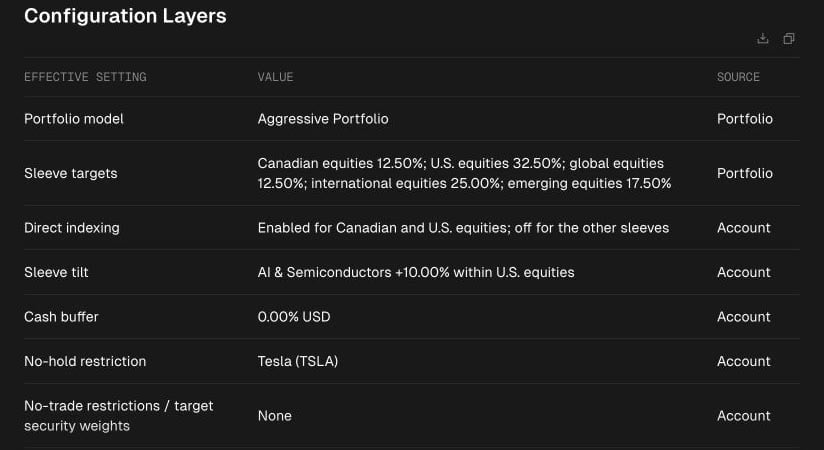
Ask Tilt Agent: **"Show Taylor Morgan's account, its portfolio assignment, effective sleeve weights, and account-specific settings."** Check the organization, client, and account in the response. A portfolio name alone does not establish which account a setting affects.
If the portfolio is missing, ask: **"Propose assigning Aggressive Portfolio to this account. Show its effective allocation before saving."** Confirm the exact assignment, then ask Tilt Agent to read back the saved portfolio and weights. [Build a model portfolio](/advisor/build-model-portfolio) explains the shared structure.
 ## 2. Propose one account change
Ask for a concrete setting, such as **"Propose a 5% USD cash buffer for Taylor Morgan's account. Show the current value, the value that would take effect, and its source. Do not save yet."**
Review the full proposal. The account can have restrictions, cash settings, tax preferences, direct-indexing choices, and Tilt adjustments. A change may replace a complete collection, so check which existing choices the proposal preserves. Confirm the specific account change only after the proposed and effective values match your intent.
## 3. Verify the result
Ask: **"Read Taylor Morgan's saved account settings and explain which value now takes effect."** A successful write response is followed by a read of persisted state. If Tilt Agent reports a conflict or uncertain save, inspect the account again before proposing the remaining change.
Account tailoring changes optimization inputs. It does not itself run an optimization or place trades. [Understand settings and rules](/advisor/configuration-and-rules) explains inherited values and Dynamic Rules; [Review a rebalance](/advisor/review-rebalance) covers the later proposal.
This documentation is built and hosted on [Mintlify](https://mintlify.com), a developer documentation platform.
## 2. Propose one account change
Ask for a concrete setting, such as **"Propose a 5% USD cash buffer for Taylor Morgan's account. Show the current value, the value that would take effect, and its source. Do not save yet."**
Review the full proposal. The account can have restrictions, cash settings, tax preferences, direct-indexing choices, and Tilt adjustments. A change may replace a complete collection, so check which existing choices the proposal preserves. Confirm the specific account change only after the proposed and effective values match your intent.
## 3. Verify the result
Ask: **"Read Taylor Morgan's saved account settings and explain which value now takes effect."** A successful write response is followed by a read of persisted state. If Tilt Agent reports a conflict or uncertain save, inspect the account again before proposing the remaining change.
Account tailoring changes optimization inputs. It does not itself run an optimization or place trades. [Understand settings and rules](/advisor/configuration-and-rules) explains inherited values and Dynamic Rules; [Review a rebalance](/advisor/review-rebalance) covers the later proposal.
This documentation is built and hosted on [Mintlify](https://mintlify.com), a developer documentation platform.