> ## Documentation Index
> Fetch the complete documentation index at: https://docs.tilt.now/llms.txt
> Use this file to discover all available pages before exploring further.
# Compare a model's account configurations
> See which accounts follow a model, which customize its sleeves, and how they differ.
A model's accounts can customize its sleeves with their own tilts, direct indexing, or holdings. Use configurations to see those differences from the model, without opening each account. A configuration is a group of accounts that customize the model's sleeves in exactly the same way. The screenshots show the **Global 80/20** model in the made-up Northwind Family Office practice.
[Models and benchmarks](/advisor/models-and-benchmarks#configurations-group-accounts-that-match) explains which differences count.
## 1. Find models with customized accounts
Open **Models** in the sidebar. The **Configurations** column summarizes each model:
| Value | Meaning |
| - | - |
| **As modeled** | Every account follows the model's sleeves. |
| **1 configuration** | Every account makes the same customization. |
| **5 configurations** | The accounts form five groups, which can include **As modeled**. |
| **—** | No account uses the model. |
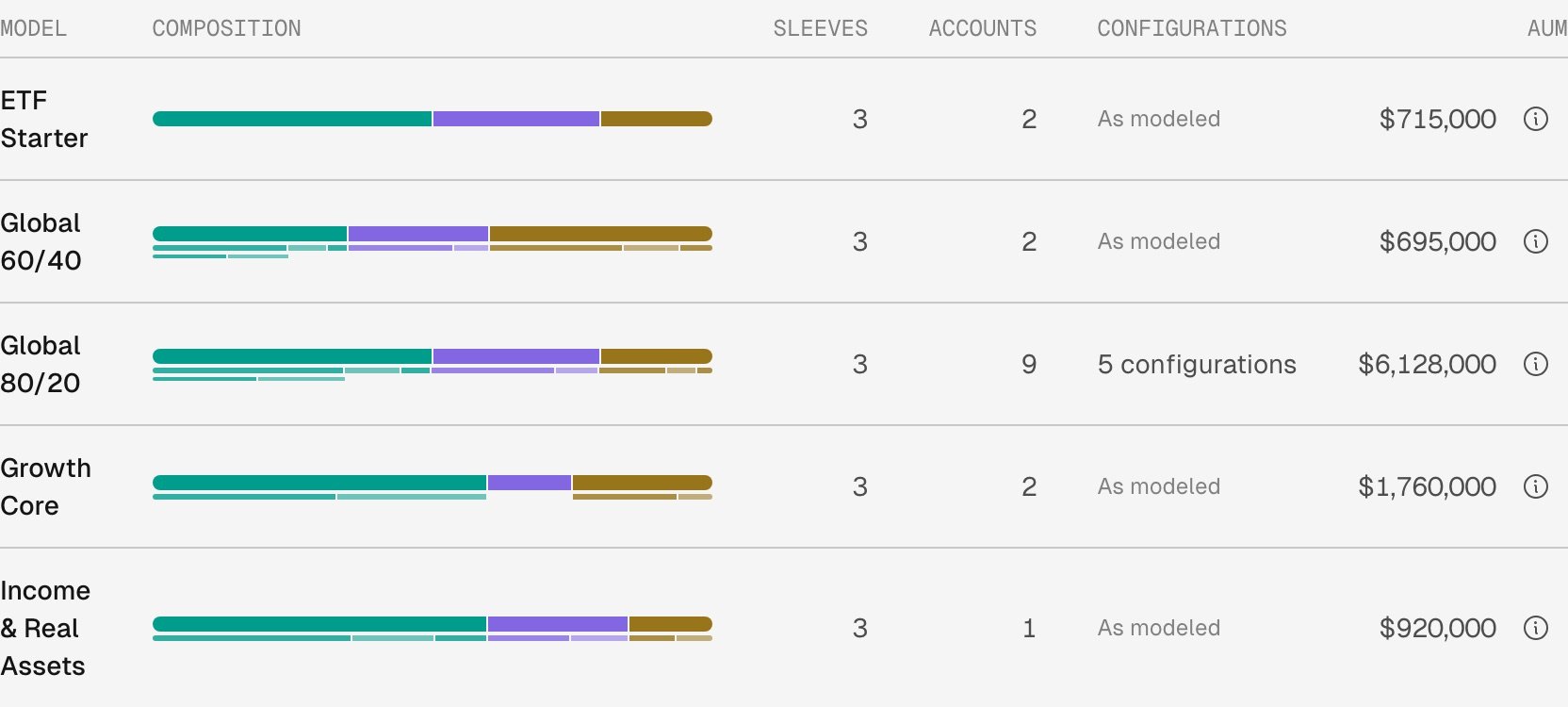 Select a configuration count to open the model at its **Configurations** section.
## 2. Read the groups
**Configurations** sits below the Allocation tree. **As modeled** comes first. The other groups follow, the largest number of accounts first, then the largest value. Each group lists the sleeves it changes and what its accounts set there, with its account count, its value, and a bar for its share of the model's value.
Select a configuration count to open the model at its **Configurations** section.
## 2. Read the groups
**Configurations** sits below the Allocation tree. **As modeled** comes first. The other groups follow, the largest number of accounts first, then the largest value. Each group lists the sleeves it changes and what its accounts set there, with its account count, its value, and a bar for its share of the model's value.
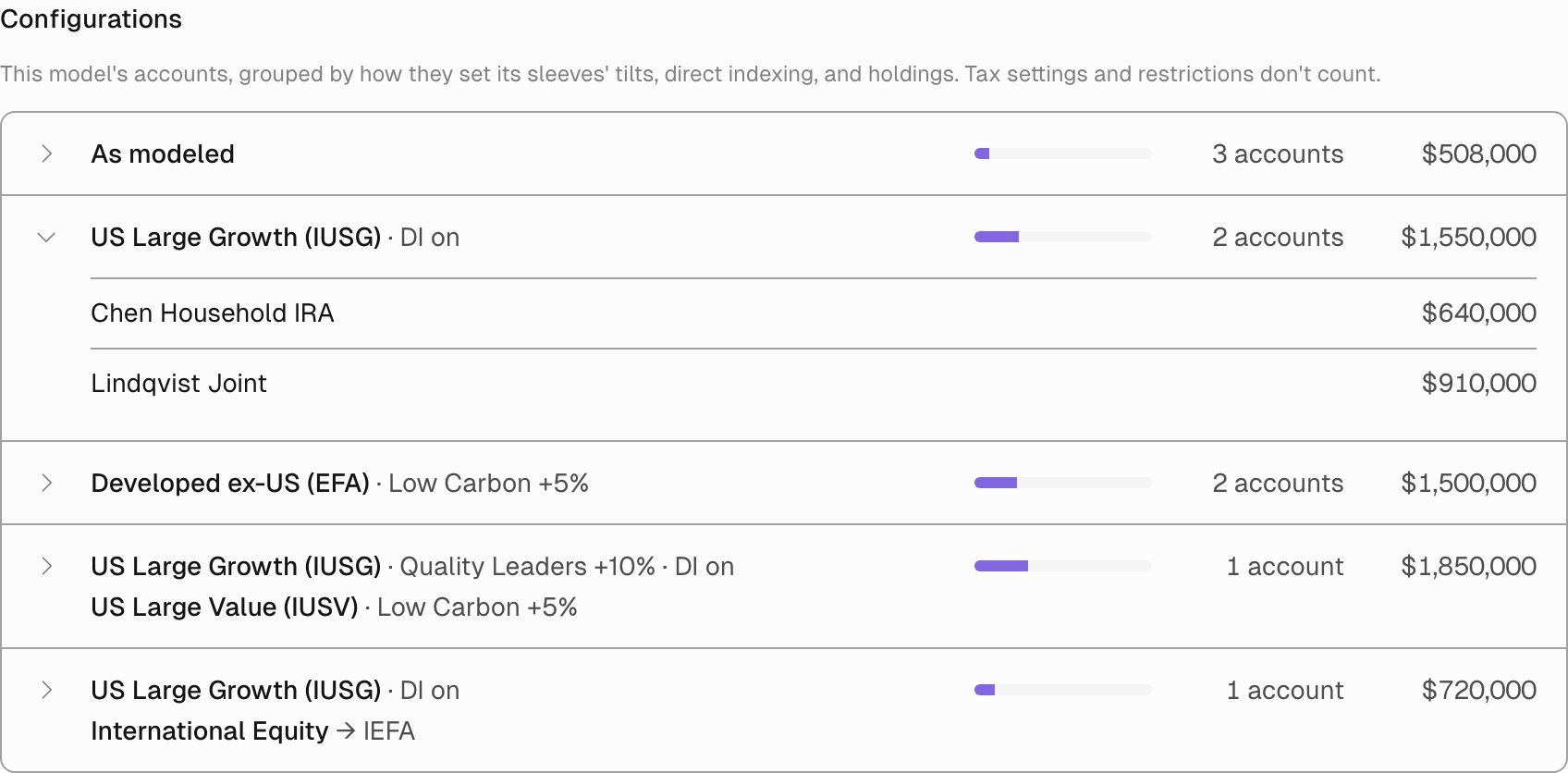 Each line names a sleeve and the change:
| Line | Meaning |
| - | - |
| US Large Growth (IUSG) · DI on | The accounts direct index this sleeve. |
| Developed ex-US (EFA) · Low Carbon +5% | The accounts apply the Low Carbon tilt to this sleeve at +5%. |
| International Equity → IEFA | The accounts hold IEFA in place of this sleeve's own holdings. |
Hover over a sleeve name to see its full place in the model, such as **US Equity › US Large Cap › US Large Growth (IUSG)**. Select a group to list its accounts, then select an account to open its **Setup**.
## 3. Check one sleeve
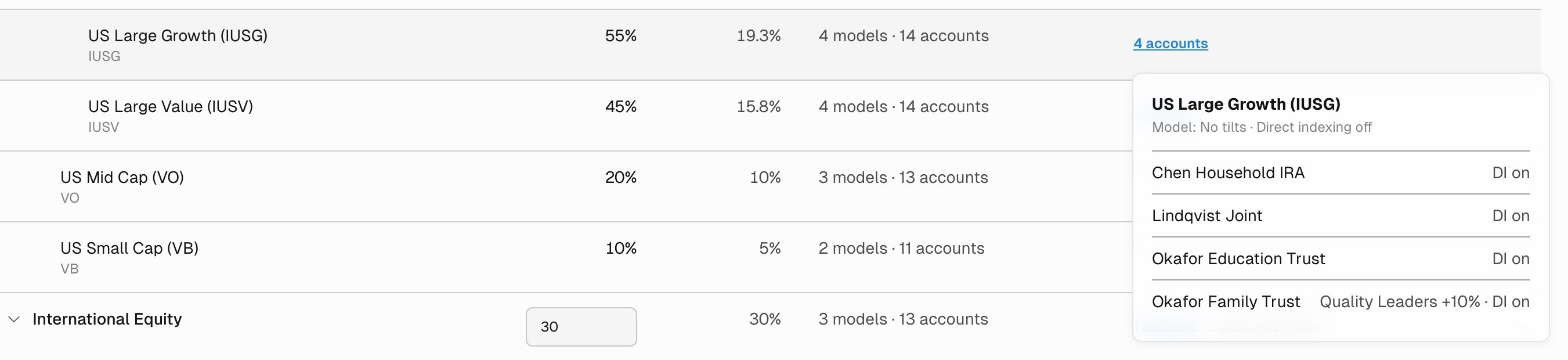
The Allocation tree adds a **Customized in** column when any account differs from the model. A sleeve's count opens a list of the accounts that customize it, each with its change, under the model's own setting. A composite shows how many accounts change something inside it, such as **4 accounts inside**.
Each line names a sleeve and the change:
| Line | Meaning |
| - | - |
| US Large Growth (IUSG) · DI on | The accounts direct index this sleeve. |
| Developed ex-US (EFA) · Low Carbon +5% | The accounts apply the Low Carbon tilt to this sleeve at +5%. |
| International Equity → IEFA | The accounts hold IEFA in place of this sleeve's own holdings. |
Hover over a sleeve name to see its full place in the model, such as **US Equity › US Large Cap › US Large Growth (IUSG)**. Select a group to list its accounts, then select an account to open its **Setup**.
## 3. Check one sleeve
The Allocation tree adds a **Customized in** column when any account differs from the model. A sleeve's count opens a list of the accounts that customize it, each with its change, under the model's own setting. A composite shows how many accounts change something inside it, such as **4 accounts inside**.
 ## 4. Ask Tilt Agent
Tilt Agent reads the same groups. Ask, for example, **"How many distinct setups do the Global 80/20 accounts have, and which accounts direct index US Large Growth?"** It reports the configurations and names the accounts in a group.
Configurations are read-only. To change an account's customization, open its **Setup** and follow [Tailor a client account](/advisor/tailor-account). To change what every account on the model holds, change the model: [Build a model portfolio](/advisor/build-model-portfolio).
This documentation is built and hosted on [Mintlify](https://mintlify.com), a developer documentation platform.
## 4. Ask Tilt Agent
Tilt Agent reads the same groups. Ask, for example, **"How many distinct setups do the Global 80/20 accounts have, and which accounts direct index US Large Growth?"** It reports the configurations and names the accounts in a group.
Configurations are read-only. To change an account's customization, open its **Setup** and follow [Tailor a client account](/advisor/tailor-account). To change what every account on the model holds, change the model: [Build a model portfolio](/advisor/build-model-portfolio).
This documentation is built and hosted on [Mintlify](https://mintlify.com), a developer documentation platform.